Online payments with Stripe
By integrating Stripe with DiveManager, you can accept credit card payments directly from your public booking page. Customers pay online; payments are recorded automatically against bookings.
What is Stripe?
Stripe is an online payment platform used by millions of businesses worldwide. DiveManager integrates with Stripe to handle:
- Online booking payments (public checkout)
- Online dive package purchases
- Online deposit payments
Stripe handles card data security — DiveManager never sees your customers' card numbers.
What you need
To set up Stripe you need a Stripe account (free to create at stripe.com). Once your account is created and verified, you need three values:
| Value | Where to find it | Description |
|---|---|---|
| Publishable key | Stripe Dashboard → Developers → API keys | Starts with pk_live_ (production) or pk_test_ (test) |
| Secret key | Stripe Dashboard → Developers → API keys | Starts with sk_live_ (production) or sk_test_ (test). Never share this. |
| Webhook secret | Stripe Dashboard → Developers → Webhooks → endpoint detail | Starts with whsec_. Generated by Stripe when you set up the endpoint. |
:::caution Use test mode first
Before going live, configure Stripe with test keys (pk_test_ / sk_test_) and verify that payments work. You can use the test card 4242 4242 4242 4242 with any future date and any CVC.
:::
What is a webhook?
A webhook is an automatic notification that Stripe sends to DiveManager every time a payment event occurs — for example when a customer completes a payment or when a payment fails.
Without webhooks, DiveManager would not know that a payment succeeded and could not automatically confirm the booking. Webhooks are therefore required for online payments to work correctly.
DiveManager automatically generates the webhook URL for your dive center. You just copy it into Stripe.
Step-by-step setup
Step 1 — Create a Stripe account
Go to stripe.com, register, and complete identity verification. Stripe requires business details to activate real payments.
Step 2 — Get your API keys
- Log in to the Stripe Dashboard.
- In the sidebar, go to Developers → API keys.
- Copy the Publishable key and the Secret key.
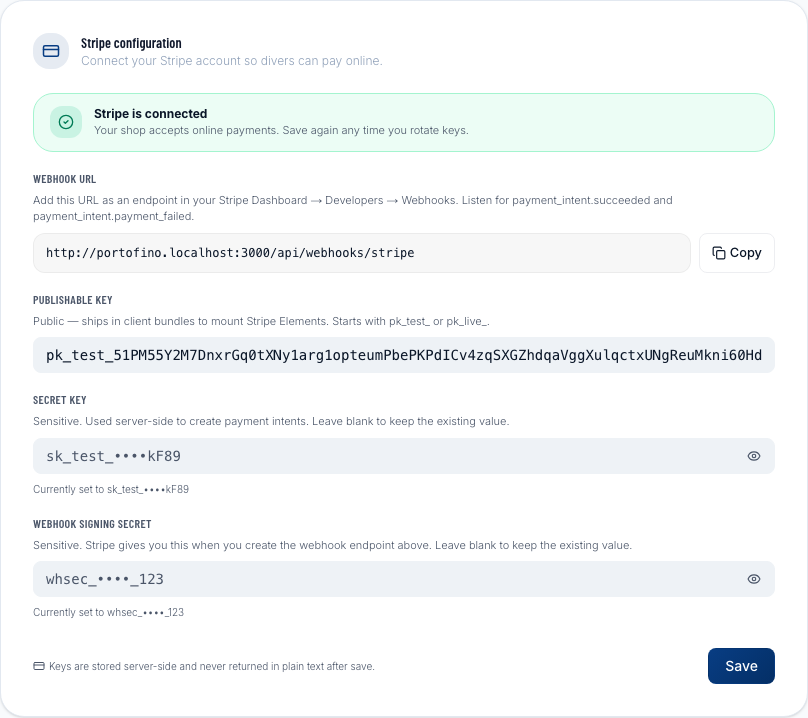
Step 3 — Paste the keys into DiveManager
- In DiveManager, go to Settings and scroll down to the Stripe section.
- Paste the Publishable key into the relevant field.
- Paste the Secret key into the relevant field.
- Click Save — don't add the webhook secret yet, we'll get to that next.
Step 4 — Set up the webhook in Stripe
After saving the keys, DiveManager shows your webhook URL (e.g. https://yourshop.divemanager.it/api/webhooks/stripe). This URL is unique to your dive center.
- Go back to the Stripe Dashboard.
- Go to Developers → Webhooks.
- Click + Add endpoint.
- Paste DiveManager's webhook URL into the Endpoint URL field.
- Under Select events, add at least:
checkout.session.completedpayment_intent.succeededpayment_intent.payment_failed
- Click Add endpoint.
- Stripe shows the Signing secret for the endpoint — copy it.
Step 5 — Paste the webhook secret into DiveManager
- Back in DiveManager, Settings → Stripe.
- Paste the Webhook secret into the relevant field.
- Click Save.
Step 6 — Test the flow
- Use test keys (
pk_test_/sk_test_). - Go to your public booking page and complete a booking using the test card
4242 4242 4242 4242. - Verify the booking appears confirmed in your DiveManager dashboard.
- When everything works, replace the test keys with live keys (
pk_live_/sk_live_) and create a new live webhook endpoint.
Status indicator
In the Stripe section of DiveManager you'll find a status indicator showing whether the configuration is Active (all three keys are present) or Not configured. If the indicator is amber, at least one key is missing.
FAQ
Does Stripe replace cash payments at the desk? No. Stripe handles only online payments (bookings from the public website). Desk payments (cash, POS card) are recorded manually as usual.
Are there extra fees from DiveManager? No. DiveManager does not charge any commission on payments. You only pay Stripe's standard fees (typically 1.5%–2.9% + a fixed fee per transaction, depending on your plan).
Can I use a different payment provider? DiveManager currently supports only Stripe for online payments. You can always record manual payments with any payment method.