Marketing Email Setup
To send campaigns, DiveManager uses your own SMTP relay. This means emails come from your email domain, not a generic DiveManager address — which greatly improves deliverability and keeps your brand front and center.
What you need
- An SMTP server (your email provider or a dedicated sending service)
- SMTP host, port, username, and password
- A verified "from" email address on that domain
Popular options:
- Amazon SES — very affordable, excellent deliverability
- Mailgun — easy setup, good free tier
- Brevo (Sendinblue) — popular in Europe, GDPR-ready
- Your own mail server — fine if you manage deliverability yourself
Connecting your SMTP account
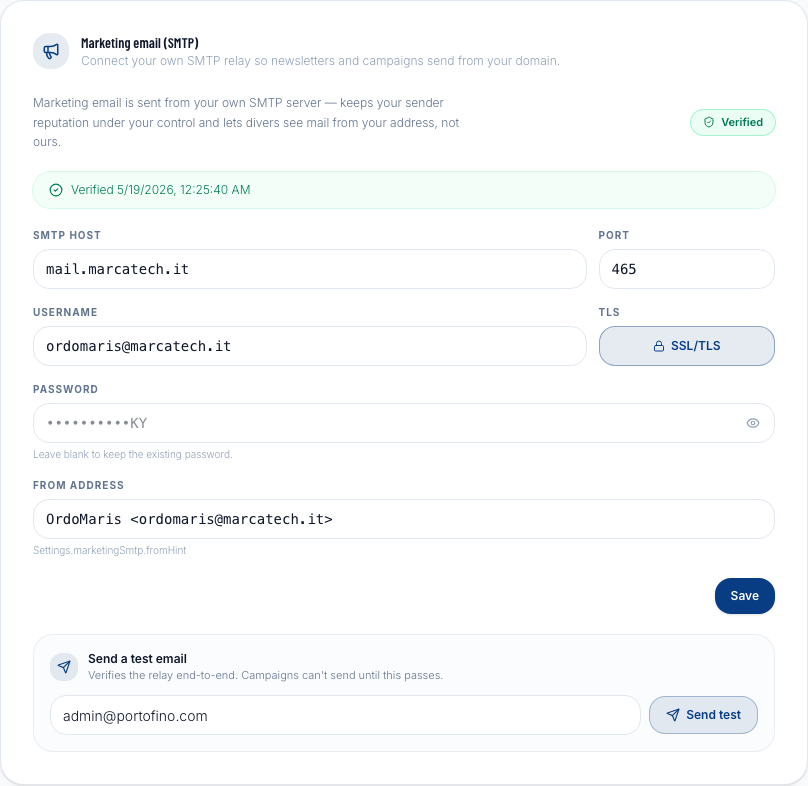
- Go to Settings → Marketing Email.
- Fill in:
- From name — what recipients see as the sender name (e.g., "Mareblu Diving")
- From email — the sender address (e.g.,
info@mareblu-diving.it) - SMTP host — your provider's SMTP server address
- SMTP port — typically 587 (STARTTLS) or 465 (SSL)
- SMTP username — usually your full email address
- SMTP password — your SMTP password or API key
- Click Save.
- Click Send test email to verify the configuration works.
If the test email arrives in your inbox, you're ready to send campaigns.
Troubleshooting
| Symptom | Likely cause |
|---|---|
| Test email not received | Check spam folder; verify host/port/credentials |
| "Authentication failed" error | Wrong username or password; try generating a new SMTP password |
| "Connection refused" error | Wrong host or port; check your provider's documentation |
| Email delivered but from wrong address | The "from" email must be verified/authorized on your SMTP provider |
Email deliverability tips
- Use a dedicated sending domain (e.g.,
mail.yourdivecenter.com) rather than your main domain — this protects your primary domain's reputation. - Set up SPF and DKIM records for your sending domain. Your SMTP provider will give you the exact DNS records to add.
- Warm up slowly — don't jump from 0 to 1,000 emails overnight. Start with smaller segments and scale up over a few weeks.
- Keep your list clean — remove hard bounces and unsubscribed addresses regularly (DiveManager handles unsubscribes automatically).